 MyListResort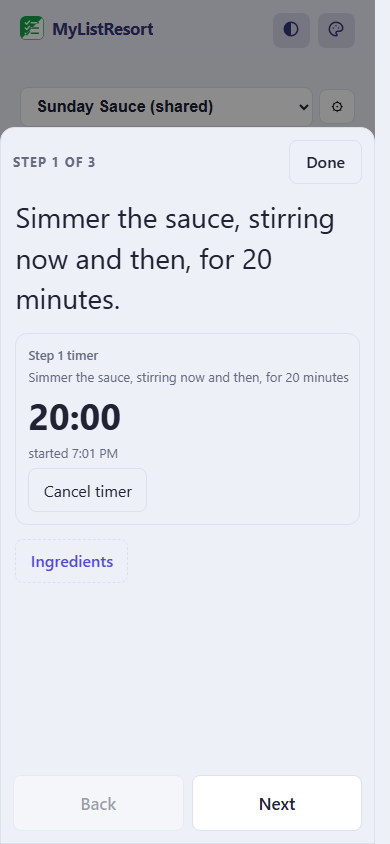
What people track
- grandma's pasta
- the sitter guide
- who to call
Starter templates
Choose a template when you create the list and its categories are set up for you. Many templates also pre-fill a ready checklist, so you start from a working list instead of a blank page. Still fully editable.
5 dinners, one grocery run
- Sheet-pan chicken & veg
- Egg fried rice
- Chicken quesadillas
- Upgraded jar pasta
- Pot chili
Starts pre-filled with 16 items, like “Chicken thighs” and “Frozen vegetables”.
Use this templateBlank recipe
- Ingredients
- From the pantry
House guide
- Who to call
- Daily routine
- Good to know
Starts pre-filled with 10 items, like “Emergency contacts” and “Pediatrician”.
Use this templateFAQ
Can I share a recipe without letting people change it?
Yes, that’s the default. Everyone you invite to a recipe joins as view-only: they can read it and add the ingredients to their own lists, and the recipe stays exactly as you wrote it. If you want to write one together, promote them to a member; an editable share counts toward your plan’s shared lists like any other.
How do the ingredients get onto my grocery list?
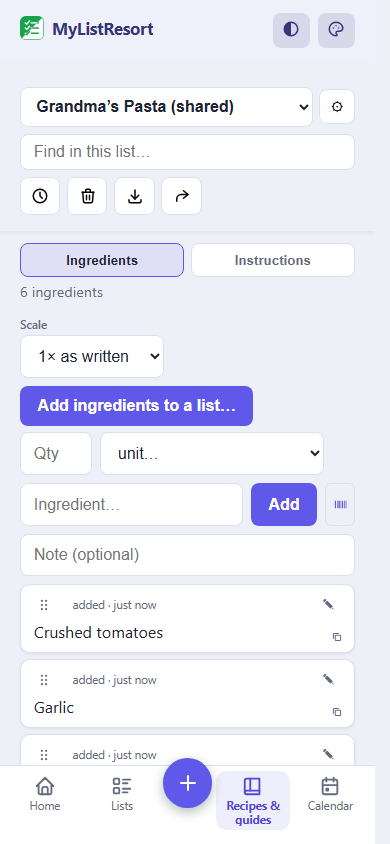
One tap. The ingredients land on the grocery list you pick, together under a category named after the recipe, with quantities and notes carried over. Adding the recipe again brings already-bought ingredients back into play instead of duplicating them.
Does it import recipes from websites or plan meals?
Websites, yes: paste a link (or share one from your phone) and MyListResort reads the recipe markup the site publishes, ingredients and steps together, ready to edit. Importing is never metered. There is still no meal planner, and no video import: a TikTok link you save keeps its source so you can write it up later. We would rather be plain about both than guess at a video.
Can it help me cook, not just shop?
Yes. Start cooking opens the recipe one step at a time in big type and keeps the screen awake. Timers come from your own words: simmer 20 minutes becomes a countdown, timers on different steps run side by side, and a long one can still reach you after you close the app (see below). The Use it up view also ranks your recipes by food that is expiring, so what needs cooking finds you. All of it is free.
Will a timer still go off if I put my phone down?
A long one will. A timer over ten minutes also gets a backup on our side, so it can reach your phone after you close the app, within about five minutes of finishing. Turn notifications on for that phone once and it keeps working. Shorter timers stay on the device and ring only while MyListResort is open: a five minute timer announced up to five minutes late would be worse than no timer, so we would rather not send it. Cook mode tells you which kind you just started, on the timer itself.
Is it free?
The current Free plan includes 3 recipes and guides on top of 3 regular lists, and a shared recipe fits up to 4 people counting you. Adding a recipe to a grocery list is currently included. At the limit, a new recipe or guide can't be created until you delete or transfer one.
The family recipe survived forty years on a stained index card and then died in a group chat. Your last resort keeps it readable, shareable, and one tap from the shopping list.