 MyListResort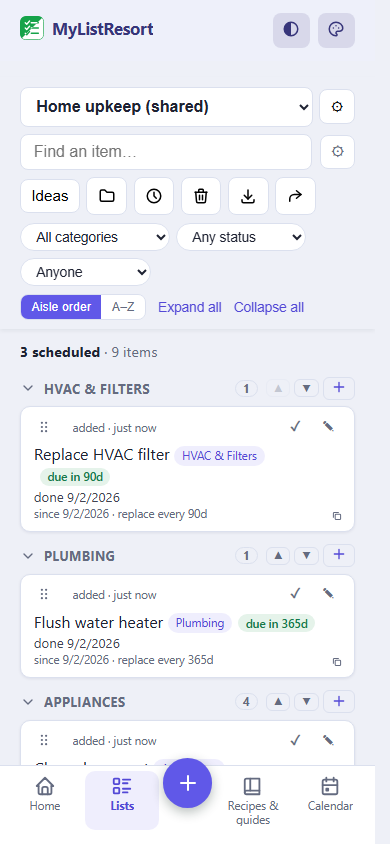
What people track
- air filter
- oil change
- deep clean the oven
- toothbrush
Starter templates
Choose a template when you create the list and its categories are set up for you. Many templates also pre-fill a ready checklist, so you start from a working list instead of a blank page. Still fully editable.
Home
- HVAC & Filters
- Plumbing
- Appliances
- Safety
- Exterior
- Yard & Garden
Starts pre-filled with 9 items, like “Replace HVAC filter” and “Test smoke and CO detectors”.
Use this templateLawn and yard
- Yard & Garden
Starts pre-filled with 5 items, like “Mow lawn” and “Sharpen mower blade”.
Use this templateAuto
- Oil & Fluids
- Tires
- Brakes
- Battery
- Filters
- Registration & Inspection
- Lights & Wipers
Starts pre-filled with 11 items, like “Change oil and filter” and “Rotate tires”.
Use this templateDiesel extras
- Filters
Starts pre-filled with 2 items, like “Replace fuel filter” and “Drain water separator”.
Use this templateMotorcycle
- Motorcycle
Starts pre-filled with 5 items, like “Clean and lube chain” and “Change oil”.
Use this templateWater softener
- Plumbing
Starts pre-filled with 2 items, like “Check and refill softener salt” and “Clean brine tank”.
Use this templateRenter upkeep
- Safety
- Appliances
- Bath & drains
- Paperwork & walkthrough
Starts pre-filled with 16 items, like “Test smoke and CO detectors” and “Replace smoke detector batteries”.
Use this templatePet care
- Meds & prevention
- Grooming
- Vet & records
- Supplies
Starts pre-filled with 13 items, like “Heartworm dose” and “Flea and tick dose”.
Use this templateCleaning
- Kitchen
- Bathrooms
- Bedrooms
- Living areas
- Whole home
Starts pre-filled with 15 items, like “Deep clean oven” and “Clean microwave”.
Use this templatePersonal upkeep
- Grooming
- Oral care
- Health checkups
Starts pre-filled with 7 items, like “Replace toothbrush” and “Replace razor blade”.
Use this templateBills & subscriptions
- Rent & utilities
- Insurance & renewals
- Subscriptions
Starts pre-filled with 5 items, like “Rent or mortgage due” and “Settle shared expenses”.
Use this templateBaby & postpartum supplies
- Diapering
- Feeding
- Recovery
Starts pre-filled with 7 items, like “Reorder diapers” and “Reorder wipes”.
Use this templateFAQ
Can MyListResort handle recurring maintenance, not just one-off tasks?
Yes. The maintenance list type tracks a replacement schedule, so an item like an HVAC filter can recur on the interval you set.
Does it come with ready-made checklists?
Yes. Starter templates (Home, Lawn and yard, Auto, Diesel extras, Motorcycle, Water softener, Renter upkeep, Pet care, Cleaning, Personal upkeep, Bills & subscriptions, Baby & postpartum supplies) seed the list with common tasks and editable starting intervals, like an HVAC filter every 90 days, a toothbrush every 3 months, or smoke-detector batteries once a year. Review the manufacturer’s instructions, then add, remove, or retime anything.
Is this only for the house and the car?
No. The same list tracks the replace-by dates on your own routine: a toothbrush every 90 days, a razor blade every 14, a haircut every 6 weeks, a dentist visit every 6 months, an eye exam and a physical once a year. It is a different job from cleaning, so it is a different starter template: Cleaning covers the house and its textiles, Personal upkeep covers you and the things that touch you. Daily habits like brushing and showering stay out of these maintenance templates on purpose: a missed daily marked overdue in red is a guilt trip, not a reminder. They belong on a routine board instead, where a step is a card to move rather than a date to miss.
Do I have to think of every task myself?
No. Every maintenance list has an Ideas picker with a catalog of ready-made tasks, each with a starting interval already on it, grouped so you can skim a section instead of a long list. Add the ones that apply and skip the rest. It is how a list grows after the starter template: you are picking from suggestions rather than remembering what you forgot.
Will it tell me when a job is coming up?
Yes, if you turn on notifications. An upcoming job gets a heads-up two days out, the day before, and on the day itself, sent at the hour you pick. Everything due that day comes as one notification, so a busy week does not turn into a stream of buzzes.
Do I have to fill in a form to set the schedule?
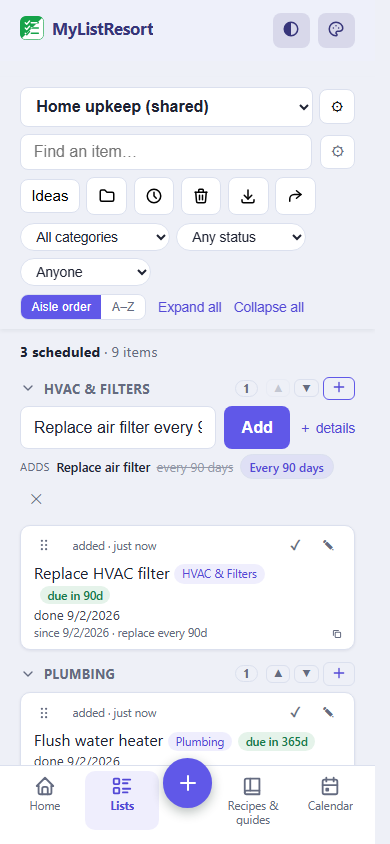
No. Type the schedule into the item itself and it is set for you: "Replace air filter every 90 days", or "Mow lawn every monday" for a weekly job that stays on Mondays even when you get to it late. You can also say when the clock started, as in "Furnace filter installed last tuesday". The date shows before you add it and one tap removes it.
Nobody remembers the air filter. The app you tried before didn’t either. A shared schedule at your last resort finally does.