 MyListResort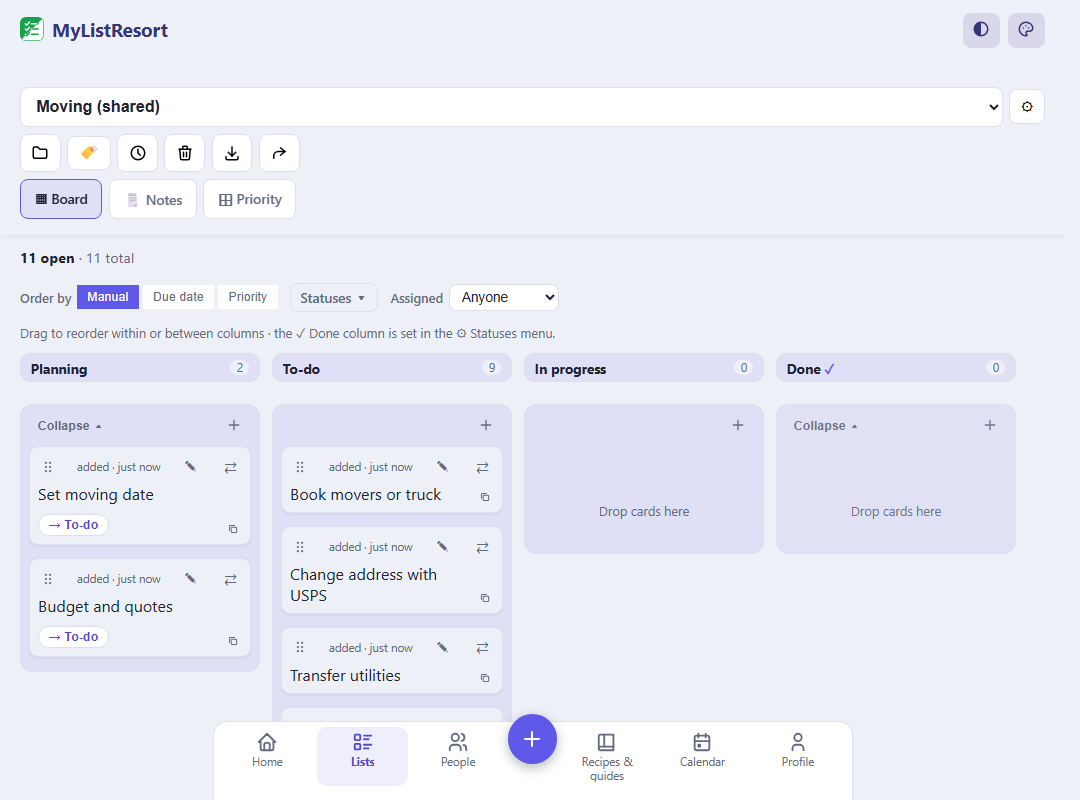
What people track
- home projects
- moving
- trip planning
- large events (weddings)
Starter templates
Choose a template when you create the list and its categories are set up for you. Many templates also pre-fill a ready checklist, so you start from a working list instead of a blank page. Still fully editable.
Classic
- To Do
- Doing
- Blocked
- Done
Simple
- To Do
- Doing
- Done
Project
- Backlog
- To Do
- Doing
- Blocked
- Done
Chores
- To Do
- This week
- Done
Moving
- Planning
- To-do
- In progress
- Done
Starts pre-filled with 11 items, like “Set moving date” and “Budget and quotes”.
Use this templateWedding
- Ideas
- To book
- In progress
- Week of
- Done
Starts pre-filled with 17 items, like “Guest list draft” and “Theme and colors”.
Use this templateEvent planning
- Ideas
- To-do
- Booked
- Done
Starts pre-filled with 8 items, like “Pick a date” and “Guest list”.
Use this templateChore board
- Backlog
- To Do
- Doing
- Done
FAQ
Can I use MyListResort as a free kanban board?
Yes. The progress-board list type gives you drag-and-drop columns (to-do, doing, done) your whole household can share, free. It’s built for home life (chores, projects, and planning) rather than the workplace.
Do cards with a due date get a reminder?
Yes, once notifications are on. A card with a due date is nudged ahead of the day and again on it, and cards already sitting in the done column stay quiet. Assignments notify the person you assign, not the whole board.
How does “done” work on a board?
The last column is the done column; moving a card there checks it off. Pick a Classic, Simple, Project, or Chores column layout, start from a ready-made Moving, Wedding, or Event planning board that comes with starter cards, or use the Chore board template. Eligible household members age 13+ can use their own accounts; an adult manages chores for younger children.
Household projects don’t need a work tool and a morning standup. Kanban at your last resort: columns, cards, done.