 MyListResort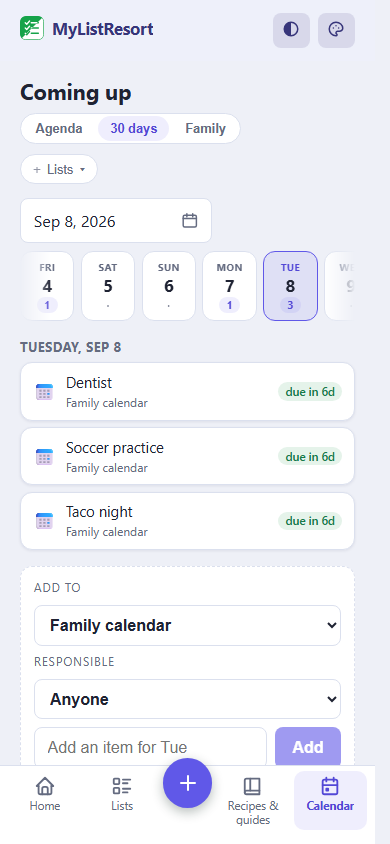
What people track
- dentist at 3
- soccer practice
- taco night
- permission slip due
Starter templates
Choose a template when you create the list and its categories are set up for you. Many templates also pre-fill a ready checklist, so you start from a working list instead of a blank page. Still fully editable.
Family calendar
- Appointments
- Activities
- Meals
FAQ
Who can change an event once it is on the calendar?
Only the person who added it, and that includes the list owner. Everyone in the household can add their own events and check off anything as done, because completion is shared, but nobody can quietly rewrite or delete somebody else’s appointment. It is the one rule that stops a shared calendar turning into an argument about what changed.
Can I plan meals on it?
Yes, and the meals connect to the shopping. Put the week’s dinners on the calendar like any other event, and link each one to a recipe list you already keep. The calendar then shows the recipe beside the meal, and opening that recipe lets you send its ingredients to a grocery list, scaled if you are cooking for more. You still add each recipe’s ingredients yourself; MyListResort does not build the week’s shopping list for you.
Do my kids need their own accounts?
Only if they are 13 or older, and only if you want them to have one. Eligible household members age 13+ can join with their own accounts and add their own events. For younger children, an adult keeps their appointments and activities on the calendar and records what happened, so a nine-year-old’s week is on the calendar without a nine-year-old account.
Is the family calendar free?
Yes. The calendar, reminders, real-time sync and the recipe links are all included at no cost, shared with up to 4 people counting you. What the plan meters is how many lists you share at once: Free owns 3 and shares 2 of them. That cap counts lists you own, not lists you join, so the family calendar can sit right beside the shared grocery list and both stay on Free. At the limit, sharing another list needs Household.
How is this different from a calendar app?
It is a list, not a calendar app, and that is the point. It sits next to your groceries, your chores and your recipes instead of in a separate place, and it answers what needs doing rather than drawing a month grid. If you want an hour-by-hour agenda synced to work meetings, keep using your calendar app; MyListResort is for the household half nobody else is tracking.
After the wall calendar nobody reads and the shared calendar somebody keeps deleting from, your last resort is one list where what you added stays yours.